




View on Amazon
Product description


1 2 Display Modes
2 EDID Emulation
3 4K@60Hz
4 K&M Compatibility


1 Gigabit LAN & USB Dock
2 Button/Hotkey/IR Switch
3 USB & Audio Lock


1 HDMI Inputs & Outputs
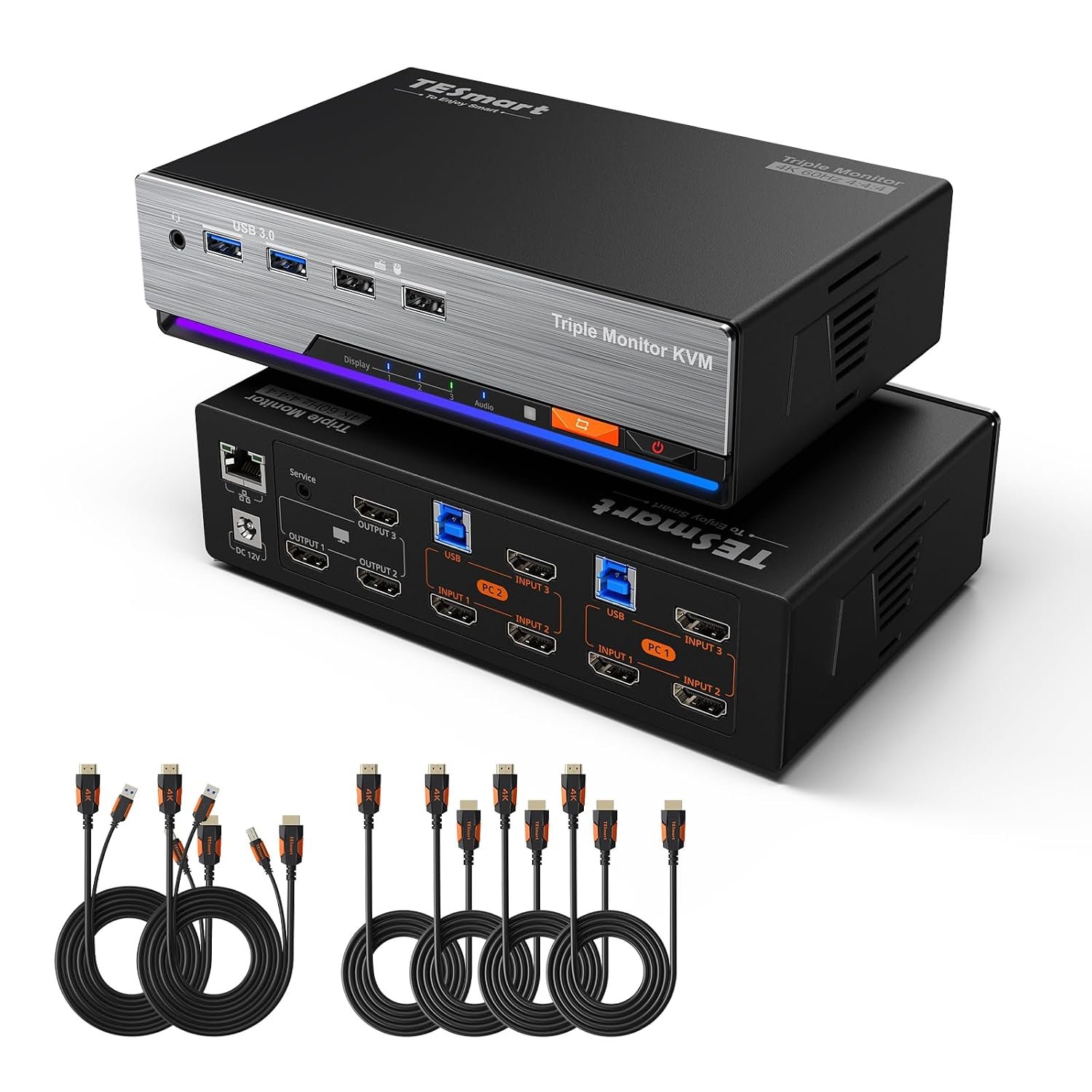
2 Package List
3 Connect Diagram


TESmart HDMI KVM Switch 3 Monitors 2 Computers Review: Powerful Triple-Display Control for Work and Gaming
Managing multiple computers and displays can quickly become complicated, especially when a setup includes several monitors, USB peripherals, audio equipment, and networking. The TESmart HDMI KVM Switch for 3 monitors and 2 computers is designed to simplify that kind of environment by allowing users to control two connected computers through a single KVM setup while supporting triple-monitor output.
With support for resolutions up to 4K at 60Hz, EDID emulation, USB 3.0 connectivity, Gigabit Ethernet, multiple switching methods, and integrated audio and microphone support, this KVM switch is built for users who want a more organized and flexible multi-computer workstation.
Triple 4K Display Support
One of the standout features of the TESmart KVM switch is its ability to provide triple-monitor 4K@60Hz vision through HDMI.
It supports resolutions up to 3840 x 2160 at 60Hz with 4:4:4 chroma, while also remaining backward compatible with 2K at both 60Hz and 120Hz. This gives the switch the flexibility to work with different display configurations depending on the user’s setup.
For professional users working with video editing, image processing, or other visually demanding tasks, the ability to maintain up to 4K@60Hz resolution across a triple-monitor environment can be especially useful. A three-screen setup provides additional workspace for applications, documents, timelines, and other content without requiring users to constantly switch between windows.
The switch is also HDCP 2.2 compliant, adding compatibility with protected digital content within supported setups.
EDID Emulation for a More Stable Display Experience
Managing multiple computers and monitors can sometimes involve annoying display-detection issues. TESmart addresses this with EDID emulators built into each input port.
The EDID emulators allow the connected computers to consistently receive the correct display information. This helps reduce the need to repeatedly adjust display settings when switching between computers.
For a multi-monitor setup, this can be particularly valuable. Instead of treating every switch as a completely new display connection, the computers can maintain consistent display information.
TESmart also highlights the benefit of stable, tear-free, and ghost-free gaming visuals. This makes the EDID implementation useful not only for productivity environments but also for users who want to switch between work and gaming systems.
Convenient Control Between Two Computers
The KVM switch supports two connected computers, making it suitable for people who regularly work with more than one system.
Rather than maintaining separate keyboards, mice, and other peripherals for every computer, a KVM allows compatible equipment to be shared between the connected systems. This can help create a cleaner and more organized workstation.
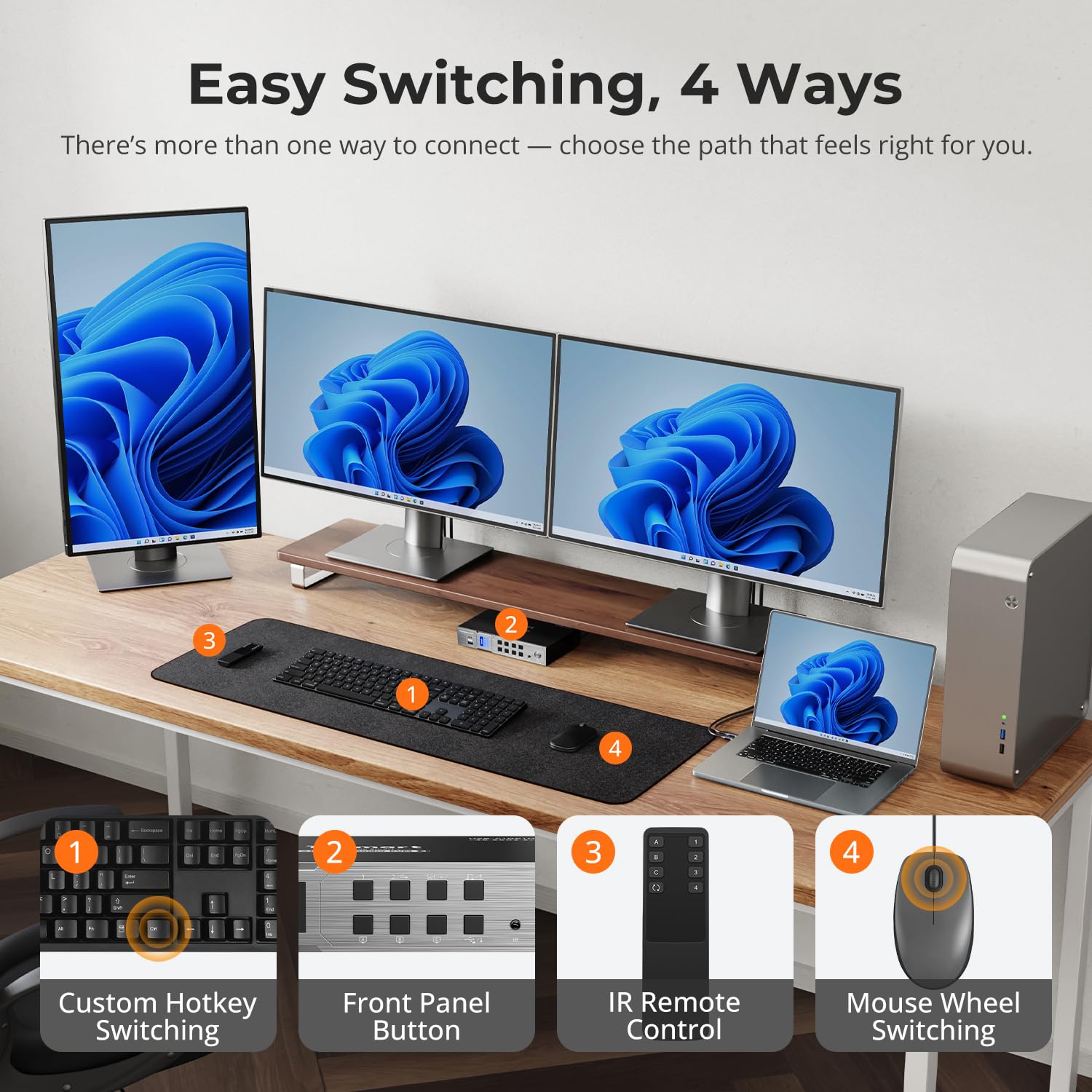
TESmart provides four different switching methods, giving users flexibility depending on how they prefer to control their setup.
You can switch using customizable keyboard hotkeys, the front-panel button, the mouse wheel, or the included IR remote. Having several control options means users can choose the method that best fits their workflow.
The customizable hotkeys can be especially convenient for users who switch frequently, while the physical button and remote provide straightforward alternatives.
The IR remote requires AAA batteries, which are not included.
Gigabit Ethernet Connectivity
Another useful feature is the integrated 1G Ethernet support.
The KVM switch allows the two connected PCs to access a wired network using just one network cable. This can help simplify cable management in a workstation where multiple computers need network connectivity.
For home offices and professional desks, reducing the number of cables running to and from the computers can make the overall setup cleaner and easier to manage.
Gigabit Ethernet also provides a familiar wired networking option for users who prefer a direct network connection rather than relying entirely on wireless connectivity.
USB 3.0 Peripheral Sharing
The TESmart KVM switch also supports USB 3.2 Gen 1 with high-speed data transfer.
This allows USB peripherals to be shared between the connected computers, helping users avoid maintaining duplicate accessories for each system.
For example, a workstation can be configured around shared USB equipment so that the same compatible peripherals can be used regardless of which computer is currently selected.
This is one of the main advantages of a KVM switch: instead of designing two completely separate workstations, users can build one central workspace that can be controlled across multiple computers.
Integrated Audio and Microphone Support
TESmart also includes integrated microphone and left/right audio output support.
This expands the KVM’s usefulness beyond video and USB switching by allowing compatible audio peripherals to become part of the shared setup.
For home-office users, creators, and gamers, keeping display, USB, and audio connectivity within the same KVM system can make switching between computers much more convenient.
Instead of treating audio equipment as a completely separate part of the workstation, users can integrate it into the overall KVM configuration.
Designed for Gaming and Home Office Setups
The feature set of this TESmart KVM switch makes it suitable for both gaming and productivity environments.
For gaming, triple 4K@60Hz support, EDID emulation, and compatibility with 2K@120Hz provide flexibility for high-resolution multi-monitor configurations. The different switching options also make it easier to move between systems without interrupting the rest of the setup.
For home-office users, the same features can be used to create a centralized workstation for two computers. Multiple monitors, USB peripherals, wired networking, and audio equipment can all become part of one organized environment.
This makes the KVM particularly interesting for users who need to move between two systems regularly but don’t want their desk filled with duplicate accessories.
A Flexible Multi-Computer Solution
The TESmart HDMI KVM Switch brings several important functions together in one device. Triple-monitor support is the centerpiece, but features such as EDID emulation, Gigabit Ethernet, USB 3.0 connectivity, audio and microphone support, and multiple switching methods make the overall package considerably more versatile.
The combination is particularly useful for users who need a professional-looking workstation capable of handling two computers without constantly reconnecting cables.
Its focus on 4K@60Hz output also gives it plenty of flexibility for modern display setups, while backward compatibility with 2K@60Hz and 120Hz allows it to accommodate different monitor configurations.
Final Verdict
The TESmart HDMI KVM Switch for 3 monitors and 2 computers is a strong solution for users who want to simplify a multi-computer, multi-monitor workstation.
Its triple 4K@60Hz support provides an impressive foundation for high-resolution setups, while EDID emulation helps maintain stable display information when switching between computers. The addition of USB 3.0 connectivity, Gigabit Ethernet, integrated audio and microphone support, and four different switching methods makes the device much more than a simple display switch.
For gaming, home-office work, video editing, and professional multi-monitor environments, the TESmart KVM offers a convenient way to bring two computers into one centralized workspace.
As long as your equipment matches the supported HDMI, USB, display, and system requirements, this KVM switch provides a practical and feature-rich approach to managing two computers across three displays.